Class 15: OAuth 2.1 Resource Server
Duration: 40 minutes | Difficulty: Intermediate-Advanced | Prerequisites: Class 12 if you took Track B, or Class 14 if you took Track C.
Familiarity with OAuth 2.1 concepts helps: issuer, JWKs, audience and scopes. The Spring GraphQL tutorial's security class explains how Spring Security's filter chain and JWT validation fit together. That tutorial issues its own tokens, and this lesson uses tokens from an OAuth authorization server.
This lesson carries on from Class 12 if you took Track B, or Class 14 if you took Track C. If you followed along, keep working on the project you already have. If you skipped it, clone the branch that matches your track, mcp_class_12 for Track B or mcp_class_14 for Track C, to start from the same place:
git clone --branch mcp_class_12 https://github.com/graphqlguy/graphQLMovieDB-MCP.git
By the end of this lesson your MCP endpoint requires a valid OAuth 2.1 access token. It exposes the protected-resource-metadata endpoint the spec mandates, validates JWTs against your authorization server, and applies scope-based authorization per tool. addToWatchlist only works with a token that has the watchlist:write scope. Your existing GraphQL authorization keeps working, because the MCP tools pass the caller's security context into the GraphQL execution.
The hands-on work in this lesson modifies the Track B server as Class 12 left it. If you took Track A, read the lesson for the spec requirements and the resource-server concepts, then configure the equivalent through Apollo MCP Server's transport.auth block, which Class 5 introduced. There Apollo plays the resource-server role instead of Spring. If you took Track C, the filter chains and the metadata endpoint apply to your code as written, with two adjustments. Add /diy-mcp/** to the securityMatcher, so the chain also guards the endpoint from Class 13. And enforce the scope checks inside DiyMcpController's tool dispatch, or per tool in the registry, because the @PreAuthorize examples below sit on Track B's @McpTool methods.
The lesson uses several OAuth terms. Here is a short definition of each. Each one gets a fuller explanation later, where the lesson puts it to work.
- OAuth 2.1 is the authorization framework the MCP specification requires for HTTP servers that add authorization.
- Authorization server is the service that signs users and clients in and issues access tokens, such as Keycloak.
- Resource server is the service that accepts access tokens and protects the data, and in this lesson that service is the MCP server.
- Bearer token is an access token that works for whoever presents it, sent in the
Authorization: Bearerheader. - JWT is the signed token format that carries claims such as the issuer, the audience and the scopes.
- JWK Set is the set of public keys an authorization server publishes, which a resource server uses to check token signatures.
- Issuer is the
issclaim, which names the authorization server that issued the token. - Audience is the
audclaim, which names the resources the token was issued for. - Scope is a named permission carried in a token, such as
watchlist:write. - Protected resource metadata is the JSON document, defined by RFC 9728, that tells a client which authorization servers issue tokens for a resource.
- Resource indicator is the
resourceparameter, defined by RFC 8707, that a client sends to ask for a token for one specific resource. - Method security is Spring Security's authorization check on individual methods, written as
@PreAuthorize.
When You Implement Auth, the Spec Requires OAuth 2.1
The MCP spec added OAuth 2.1 authorization in its 2025-03-26 revision. The 2025-06-18 revision defined an MCP server as an OAuth resource server, which is the model this lesson uses. Authorization is still optional for MCP servers. An HTTP server that adds it should follow the spec, and the spec defines exactly what that looks like. An MCP server that requires tokens is a resource server in the OAuth 2.1 sense. The client sends its token in the Authorization: Bearer <token> header. The server validates the token (typically a JWT, signed by an authorization server you trust) before processing any MCP request. Servers expose discovery metadata at /.well-known/oauth-protected-resource so MCP clients can find the authorization server that issues tokens.
The diagram below shows the whole exchange before we configure any part of it. A client without a token gets a refusal that tells it where to get one, and every later step follows from there:
In that exchange, the client starts with one address, the MCP server's URL, and discovers the rest. The 401 tells it where the metadata document is, and that document names the authorization server that issues tokens. The metadata endpoint that we build later in this lesson makes that discovery possible.
All of this is new for our project. The Spring GraphQL tutorial did not use a resource server. Its security class wrote its own JWT handling:
- the jjwt library
- an HMAC shared secret
- tokens that the
loginandregistermutations issue themselves - a custom
JwtAuthFilterthat validates those tokens on every request
That setup stays as it is, and human clients keep using it on /graphql.
This lesson adds a second security filter chain in front of /mcp, built on Spring Security's OAuth 2.1 resource-server support. It validates tokens from an external authorization server against the public keys that server publishes, its JWK Set. Agents authenticate through the new chain, and humans keep authenticating through the old one. We also add the discovery endpoint that the spec requires, and a scope check on every tool, so each tool needs its own permission.
One note about spec versions before we start. This course targets MCP revision 2025-11-25, the revision Spring AI 2.0's MCP Java SDK negotiates. That revision changed how clients register, with Client ID Metadata Documents (SEP-991), and added discovery based on OpenID Connect (OIDC). Most of its authorization changes affect clients and authorization servers. The resource-server side still uses RFC 9728 and RFC 8707. It gains one optional feature, incremental scope consent (SEP-835): a 403 response can name the scopes that a request still needs. The 2026-07-28 revision keeps the OAuth 2.1 resource-server model, RFC 9728 discovery and the RFC 8707 resource parameter, so everything this lesson builds still applies.
Adding the Resource Server Starter
Add spring-boot-starter-oauth2-resource-server to the moviedb pom.xml. This is a new dependency. The base app used spring-boot-starter-security and the jjwt libraries, and both stay in place for the GraphQL chain.
<dependency>
    <groupId>org.springframework.boot</groupId>
    <artifactId>spring-boot-starter-oauth2-resource-server</artifactId>
</dependency>
The starter adds JWT validation, fetching of the JWK Set, and JwtAuthenticationConverter, which turns a token's claims into an Authentication in the SecurityContext.
Configuring the Resource Server
The configuration block goes in application.yaml, as a new security: branch inside the spring: key that is already there. This is the same merge Classes 6 and 8 made under spring.ai. If you add a second top-level spring: key, startup fails with found duplicate key spring, and every Spring test in the suite fails with it:
spring:
  security:
    oauth2:
      resourceserver:
        jwt:
          issuer-uri: http://localhost:8180/realms/moviedb
          audiences:
            - moviedb-mcp
          jwk-set-uri: http://localhost:8180/realms/moviedb/protocol/openid-connect/certs
issuer-uri is the address of the authorization server. Spring checks the token's iss claim against it. Spring also uses it to find the JWK Set URI through OIDC metadata when you leave jwk-set-uri out. audiences makes Spring reject tokens that were issued for a different resource server. jwk-set-uri is the endpoint where Spring fetches the public keys that verify token signatures.
These values point at a Keycloak realm named moviedb on localhost:8180, which the Verifying section starts in Docker. The same pattern works against any OAuth 2.1 authorization server, such as Auth0, Okta, AWS Cognito or Spring Authorization Server. In production, use the authorization server your platform team runs, and set these values through the production profile from Class 17.
Protecting /mcp
The Spring Security configuration below decides which paths need a token:
package com.graphqlguy.moviedb.security;

import org.springframework.beans.factory.annotation.Value;
import org.springframework.context.annotation.Bean;
import org.springframework.context.annotation.Configuration;
import org.springframework.core.annotation.Order;
import org.springframework.security.config.annotation.web.builders.HttpSecurity;
import org.springframework.security.config.http.SessionCreationPolicy;
import org.springframework.security.web.SecurityFilterChain;

import java.util.List;

/**
 * Class 15: a second security filter chain, scoped by {@code securityMatcher}
 * to the MCP paths and ordered ahead of the prerequisite tutorial's HMAC chain.
 * It makes /mcp an OAuth 2.1 resource server: bearer JWTs validated against the
 * configured issuer's JWK Set, while the discovery endpoints stay public. The
 * two chains never contend because this one matches only /mcp and the
 * well-known paths; everything else falls through to the default chain.
 */
@Configuration
public class McpSecurityConfig {

    @Value("${moviedb.mcp.resource}")
    private String resource;

    @Value("${spring.security.oauth2.resourceserver.jwt.issuer-uri}")
    private String issuer;

    @Bean
    @Order(1)
    SecurityFilterChain mcpFilterChain(HttpSecurity http) throws Exception {
        // RFC 9728 section 5.1: a 401 from a protected resource should carry a
        // WWW-Authenticate header with a resource_metadata parameter, which
        // tells a client without a token where the metadata document is.
        // Spring Security 7's default BearerTokenAuthenticationEntryPoint adds
        // that parameter itself, built from the address of the request, so the
        // chain keeps the default.
        http
            // /mcp is a stateless bearer-token API, so both of these matter.
            // CsrfFilter would otherwise reject every POST without a token,
            // and an MCP streamable-HTTP client's very first request is a POST
            // `initialize`: the client would get a 403 with no
            // WWW-Authenticate header and no way to discover what it needs.
            // The default chain disables both for the same reason.
            .csrf(csrf -> csrf.disable())
            .sessionManagement(session ->
                session.sessionCreationPolicy(SessionCreationPolicy.STATELESS))
            .securityMatcher("/mcp", "/mcp/**",
                "/.well-known/oauth-protected-resource",
                "/.well-known/oauth-protected-resource/mcp")
            .authorizeHttpRequests(auth -> auth
                .requestMatchers("/.well-known/oauth-protected-resource",
                    "/.well-known/oauth-protected-resource/mcp").permitAll()
                .anyRequest().authenticated())
            .oauth2ResourceServer(oauth -> oauth
                .jwt(jwt -> {})
                // Spring Security serves the RFC 9728 document itself, from a
                // filter that runs ahead of the DispatcherServlet. Describing
                // the resource here is the only way to change that document. A
                // @RestController mapped to the same paths is bypassed, because
                // the filter answers those requests first.
                .protectedResourceMetadata(metadata -> metadata
                    .protectedResourceMetadataCustomizer(builder -> builder
                        .resource(resource)
                        .authorizationServer(issuer)
                        .scopes(scopes -> scopes.addAll(List.of(
                            "movies:read", "watchlist:read",
                            "watchlist:write", "reviews:read")))
                        .claim("resource_documentation",
                            "https://graphqlguy.com/docs/tutorial-graphql-mcp"))));
        return http.build();
    }
}
Because of @Order(1), this chain runs before the GraphQL chain. It handles /mcp, every path under it, and the two discovery paths. Anyone can read the discovery paths, and every other path needs a valid JWT. oauth2ResourceServer hands the JWT validation to the resource-server starter.
The chain keeps Spring Security's default AuthenticationEntryPoint, because the default already sends the challenge MCP needs. RFC 9728, section 5.1, says a 401 from a protected resource should carry a WWW-Authenticate header with a resource_metadata parameter. That parameter holds the metadata URL, and it tells a client without a token where to find the metadata document. The 2025-11-25 spec requires servers to provide at least one of two discovery mechanisms: this header, or the metadata document at its well-known URI. Clients must use the header when it is present, and try the well-known paths when it is missing. This fallback comes from SEP-985. In the previous revision, 2025-06-18, the header was mandatory.
Spring Security 7's BearerTokenAuthenticationEntryPoint adds resource_metadata to every 401 it sends. It builds the URL from the address of the request, so a server on localhost:8080 answers with http://localhost:8080/.well-known/oauth-protected-resource. Behind a reverse proxy, the URL shows the public address only when Spring sees that address, for example through server.forward-headers-strategy. We also serve the metadata document, so a client can use either mechanism. If you would rather not configure this yourself, the community mcp-security library provides the metadata endpoint and the resource validation through McpServerOAuth2Configurer.mcpServerOAuth2().
The existing GraphQL filter chain stays as the Spring GraphQL tutorial set it up. It permits every request at the HTTP level and leaves authorization to the method-level @PreAuthorize checks. The custom JwtAuthFilter keeps validating the HMAC-signed tokens that the login and register mutations issue, so /graphql keeps serving human clients with those tokens.
@Order(1) and the securityMatcher limit the new chain to the MCP paths, so each request goes to exactly one of the two chains. The two chains protect different paths with different kinds of token. /graphql accepts the HMAC-signed JWTs that the app issues itself. /mcp accepts JWTs from the authorization server and validates them against its JWK Set. If you later want a single kind of token, point the GraphQL chain at the same issuer and stop issuing your own tokens. In this tutorial the two chains run side by side.
The Protected Resource Metadata Endpoint
The metadata document is the second discovery mechanism from the previous section. A server that uses it serves the document under /.well-known/oauth-protected-resource. The response is JSON with three things: the resource identifier, the authorization servers that issue tokens for it, and the scopes the resource accepts. RFC 9728 has one detail that is easy to miss. The well-known part goes before the resource's path, so for the resource http://localhost:8080/mcp, a client requests http://localhost:8080/.well-known/oauth-protected-resource/mcp.
We also map the bare path, /.well-known/oauth-protected-resource. A client that probes for the /mcp resource tries the path ending in /mcp first, and then the bare path. The resource_metadata link in a 401 also points at the bare path. The bare path still cannot serve a client that treats the whole host as the resource. RFC 9728, section 3.3, requires a client to check that the document's resource value matches the resource it asked about. Our document says http://localhost:8080/mcp, so that client rejects it.
The obvious approach is a @RestController mapped to those two paths. It does not work, and the failure is silent. Spring Security 7 adds an OAuth2ProtectedResourceMetadataFilter to the chain as soon as you configure oauth2ResourceServer(...), and that filter answers both well-known paths itself. Filters run before the DispatcherServlet, so the filter answers every request to those paths before your controller gets a chance. The controller still compiles and maps correctly. The endpoint answers with the framework's minimal document, and that document lacks the authorization_servers entry, which is the one field a client without a token needs.
Describe the resource through the Spring Security configuration DSL instead. The configuration class reads two values into fields:
@Value("${moviedb.mcp.resource}")
private String resource;

@Value("${spring.security.oauth2.resourceserver.jwt.issuer-uri}")
private String issuer;
The filter chain shown earlier uses them inside its oauth2ResourceServer block, to describe the resource:
.protectedResourceMetadata(metadata -> metadata
    .protectedResourceMetadataCustomizer(builder -> builder
        .resource(resource)
        .authorizationServer(issuer)
        .scopes(scopes -> scopes.addAll(List.of(
            "movies:read", "watchlist:read",
            "watchlist:write", "reviews:read")))
        .claim("resource_documentation",
            "https://graphqlguy.com/docs/tutorial-graphql-mcp")))
The filter fills in bearer_methods_supported and tls_client_certificate_bound_access_tokens for you. The second is true because Spring's default JWT validation checks a token's certificate binding when the token carries one. For any other RFC 9728 field that the builder does not have a method for, use claim(...).
Add moviedb.mcp.resource to application.yaml. Unlike the spring.security block above, this one is a new top-level key, so it goes at the end of the file:
moviedb:
  mcp:
    resource: http://localhost:8080/mcp
This is the address of the MCP endpoint on your machine. The production profile in Class 17 sets the public address from an environment variable.
This value does more than label the JSON. It is the canonical resource URI defined by RFC 8707, Resource Indicators. MCP clients MUST send resource=<canonical MCP URL> when they request a token. An authorization server that implements RFC 8707 then issues the token for this resource only, usually by putting the resource URI in the token's aud claim. The audiences entry in the resource-server configuration is the server's side of that check: Spring rejects any token whose aud does not include one of the listed values. So audiences must match what your authorization server actually writes into aud. Keycloak does not act on the resource parameter (checked with Keycloak 26.7.3), so this lesson gives its tokens the audience moviedb-mcp through an audience mapper, which the Verifying section sets up.
An MCP client that does not yet have a token discovers this endpoint, learns which authorization server to talk to, performs the OAuth flow, and comes back with a bearer token. The client code does not have to be told any of this out of band; the spec-mandated discovery makes it self-configuring.
Tool-Level @PreAuthorize
Each tool needs its own authorization check. recommendMoviesForMood is a read over movie data; it should require movies:read. summarizeMovieReviews reads reviews as well as movies, so it requires both movies:read and reviews:read. addToWatchlist is a write to user-owned data; it should require watchlist:write. Apply Spring Security's method-level checks directly on the @McpTool methods. This is recommendMoviesForMood with its check in place:
@McpTool(
    name = "recommendMoviesForMood",
    description = """
        Recommend movies that fit a given mood. Suitable for low-stakes
        recommendation flows where an agent is asking on behalf of a user.
        Results are ranked by rating, highest first, with a stable
        tiebreak on id, so repeated calls return the same order and an
        agent that retries does not see the list reshuffle under it.
        """,
    annotations = @McpTool.McpAnnotations(
        title = "Recommend Movies For Mood",
        readOnlyHint = true,
        destructiveHint = false,
        idempotentHint = true,
        openWorldHint = false))
// Class 15: reads require movies:read. SCOPE_ is Spring Security's prefix
// for OAuth scopes mapped from the JWT scope claim.
@PreAuthorize("hasAuthority('SCOPE_movies:read')")
public List<MovieSummary> recommendMoviesForMood(
        @McpToolParam(
            description = "Recommendation input: mood (one of COMFORT, ADVENTURE, ROMANCE, HORROR, THOUGHTFUL, COMEDY) and an optional excludeWatched flag, which defaults to false. Set it to true only when the user wants movies they have already marked WATCHED on their watchlist filtered out.",
            required = true)
        RecommendInput input) {

    Map<String, Object> variables = Map.of(
        "mood", input.mood().name(),
        "excludeWatched", Boolean.TRUE.equals(input.excludeWatched()));

    ExecutionGraphQlResponse response = executeOperation(
        "RecommendMoviesForMood",
        MovieOperations.RECOMMEND_MOVIES_FOR_MOOD,
        variables);

    Object value = response.field("recommendMoviesForMood").getValue();
    return objectMapper.convertValue(value, new TypeReference<List<MovieSummary>>() {});
}
The other two tools get their annotation in the same place, directly above the method. summarizeMovieReviews gets @PreAuthorize("hasAuthority('SCOPE_movies:read') and hasAuthority('SCOPE_reviews:read')"). addToWatchlist gets @PreAuthorize("hasAuthority('SCOPE_watchlist:write')"). The file also needs one new import, org.springframework.security.access.prepost.PreAuthorize.
The complete MovieMcpTools.java, collapsed because it runs to 335 lines
package com.graphqlguy.moviedb.mcp;

// Boot 4 ships Jackson 3: the auto-configured mapper lives in tools.jackson.*,
// not com.fasterxml.jackson.* (which Boot 3-era material shows).
import tools.jackson.core.type.TypeReference;
import tools.jackson.databind.ObjectMapper;
import com.graphqlguy.moviedb.recommendation.Mood;
import com.graphqlguy.moviedb.review.Review;
import com.graphqlguy.moviedb.watchlist.WatchStatus;
import io.modelcontextprotocol.spec.McpSchema.CallToolResult;
import io.modelcontextprotocol.spec.McpSchema.ElicitResult;
import org.springframework.ai.mcp.annotation.McpTool;
import org.springframework.ai.mcp.annotation.McpToolParam;
import org.springframework.ai.mcp.annotation.context.McpSyncRequestContext;
import org.springframework.ai.mcp.annotation.context.StructuredElicitResult;
import org.springframework.beans.factory.annotation.Autowired;
import org.springframework.graphql.ExecutionGraphQlRequest;
import org.springframework.graphql.ExecutionGraphQlResponse;
import org.springframework.graphql.ExecutionGraphQlService;
import org.springframework.graphql.support.DefaultExecutionGraphQlRequest;
import org.springframework.security.access.prepost.PreAuthorize;
import org.springframework.security.core.context.SecurityContext;
import org.springframework.security.core.context.SecurityContextHolder;
import org.springframework.stereotype.Service;

import java.util.HashMap;
import java.util.List;
import java.util.Map;
import java.util.UUID;
import org.jspecify.annotations.Nullable;

/**
 * Class 7: each curated GraphQL operation becomes one @McpTool method. Every
 * method has the same shape: typed input record, operation text held as a
 * constant in {@link MovieOperations}, an ExecutionGraphQlRequest executed
 * in-process through ExecutionGraphQlService, and a Jackson convertValue into
 * a typed record.
 */
@Service
public class MovieMcpTools {

    private static final int MIN_REVIEWS_FOR_SUMMARY = 3;

    private final ExecutionGraphQlService graphql;
    private final ObjectMapper objectMapper;
    private final ToolResults toolResults;
    private final SamplingReviewSummarizer samplingReviewSummarizer;

    @Autowired
    public MovieMcpTools(
            ExecutionGraphQlService graphql, ObjectMapper objectMapper, ToolResults toolResults,
            SamplingReviewSummarizer samplingReviewSummarizer) {
        this.graphql = graphql;
        this.objectMapper = objectMapper;
        this.toolResults = toolResults;
        this.samplingReviewSummarizer = samplingReviewSummarizer;
    }

    // Convenience constructors used by unit tests: a real ObjectMapper, a
    // ToolResults built on it, and a SamplingReviewSummarizer are all cheap
    // and exercise the production paths.
    public MovieMcpTools(ExecutionGraphQlService graphql, ObjectMapper objectMapper) {
        this(graphql, objectMapper, new ToolResults(objectMapper), new SamplingReviewSummarizer());
    }

    public MovieMcpTools(ExecutionGraphQlService graphql) {
        this(graphql, new ObjectMapper());
    }

    // @Nullable keeps excludeWatched out of the generated input schema's required
    // list, so a caller can leave it out. The tool treats a missing flag as false.
    public record RecommendInput(
            Mood mood,
            @Nullable Boolean excludeWatched
    ) {}

    public record MovieSummary(
            String id,
            String title,
            Integer releaseYear,
            String genre,
            Double rating
    ) {}

    public record MovieReviewSummary(
            String movieId,
            Integer reviewCount,
            @Nullable String summary,
            List<String> themes,
            @Nullable Double averageScore
    ) {}

    // @Nullable on both components keeps them out of the generated schema's
    // required list; the exactly-one rule is enforced by GraphQL's @oneOf and
    // advertised in the tool description.
    public record WatchlistSubject(
            @Nullable String movieId,
            @Nullable String tvShowId
    ) {}

    public record AddedContent(String title) {}

    public record WatchlistItemSummary(
            String id,
            WatchStatus status,
            AddedContent content
    ) {}

    @McpTool(
        name = "recommendMoviesForMood",
        description = """
            Recommend movies that fit a given mood. Suitable for low-stakes
            recommendation flows where an agent is asking on behalf of a user.
            Results are ranked by rating, highest first, with a stable
            tiebreak on id, so repeated calls return the same order and an
            agent that retries does not see the list reshuffle under it.
            """,
        annotations = @McpTool.McpAnnotations(
            title = "Recommend Movies For Mood",
            readOnlyHint = true,
            destructiveHint = false,
            idempotentHint = true,
            openWorldHint = false))
    // Class 15: reads require movies:read. SCOPE_ is Spring Security's prefix
    // for OAuth scopes mapped from the JWT scope claim.
    @PreAuthorize("hasAuthority('SCOPE_movies:read')")
    public List<MovieSummary> recommendMoviesForMood(
            @McpToolParam(
                description = "Recommendation input: mood (one of COMFORT, ADVENTURE, ROMANCE, HORROR, THOUGHTFUL, COMEDY) and an optional excludeWatched flag, which defaults to false. Set it to true only when the user wants movies they have already marked WATCHED on their watchlist filtered out.",
                required = true)
            RecommendInput input) {

        Map<String, Object> variables = Map.of(
            "mood", input.mood().name(),
            "excludeWatched", Boolean.TRUE.equals(input.excludeWatched()));

        ExecutionGraphQlResponse response = executeOperation(
            "RecommendMoviesForMood",
            MovieOperations.RECOMMEND_MOVIES_FOR_MOOD,
            variables);

        Object value = response.field("recommendMoviesForMood").getValue();
        return objectMapper.convertValue(value, new TypeReference<List<MovieSummary>>() {});
    }

    @McpTool(
        name = "summarizeMovieReviews",
        description = """
            Summarize user reviews for a specific movie. Always returns a
            summary object; when there are fewer than three reviews the
            summary field is null and the agent should read reviewCount to
            see how many there were. Use this only after the user has
            identified a movie they care about; do not call speculatively
            across many movies.
            """,
        annotations = @McpTool.McpAnnotations(
            title = "Summarize Movie Reviews",
            readOnlyHint = true,
            destructiveHint = false,
            idempotentHint = true,
            openWorldHint = false))
    @PreAuthorize("hasAuthority('SCOPE_movies:read') and hasAuthority('SCOPE_reviews:read')")
    public MovieReviewSummary summarizeMovieReviews(
            // Class 10: the framework fills in the request context, and the tool's
            // input schema leaves it out. context.progress(...) reads the
            // client's progress token on its own and skips the notification when
            // the client did not send one.
            McpSyncRequestContext context,
            @McpToolParam(description = "Movie ID, as it appears in the schema.", required = true)
            String movieId) {

        context.progress(p -> p.progress(0.0).total(1.0).message("Loading reviews"));

        List<Review> reviews = loadReviews(movieId);
        if (reviews.isEmpty()) {
            return new MovieReviewSummary(movieId, 0, null, List.of(), null);
        }
        double averageScore = reviews.stream().mapToInt(Review::getScore).average().orElseThrow();
        if (reviews.size() < MIN_REVIEWS_FOR_SUMMARY) {
            return new MovieReviewSummary(movieId, reviews.size(), null, List.of(), averageScore);
        }

        context.progress(p -> p.progress(0.4).total(1.0).message("Summarizing"));

        MovieReviewSummary summary = samplingReviewSummarizer.summarize(context, movieId, reviews, averageScore);

        context.progress(p -> p.progress(1.0).total(1.0).message("Done"));

        return summary;
    }

    // Class 11: the raw material for the summary, read through the same
    // in-process GraphQL engine as everything else.
    private List<Review> loadReviews(String movieId) {
        ExecutionGraphQlResponse response = executeOperation(
            "MovieReviews",
            MovieOperations.MOVIE_REVIEWS,
            Map.of("movieId", movieId));
        Object value = response.field("movie.reviews").getValue();
        if (value == null) {
            return List.of();
        }
        return objectMapper.convertValue(value, new TypeReference<List<Review>>() {});
    }

    @McpTool(
        name = "addToWatchlist",
        description = """
            Add a movie or TV show to the signed-in user's watch list. Provide
            exactly one of subject.movieId or subject.tvShowId, never both.
            Status is optional; when omitted the server records WANT_TO_WATCH.
            Adding a title that is already on the list fails with an "already
            in your watch list" error; treat that as already done, not as a
            failure worth retrying.
            """,
        annotations = @McpTool.McpAnnotations(
            title = "Add To Watchlist",
            readOnlyHint = false,
            destructiveHint = false,
            idempotentHint = true,
            openWorldHint = false))
    // Class 15: a write to user-owned data requires watchlist:write.
    @PreAuthorize("hasAuthority('SCOPE_watchlist:write')")
    public CallToolResult addToWatchlist(
            McpSyncRequestContext context,
            @McpToolParam(description = "The title to add: exactly one of movieId or tvShowId.", required = true)
            WatchlistSubject subject,
            @McpToolParam(description = "Optional initial status, WANT_TO_WATCH or WATCHED. Omit for the default WANT_TO_WATCH.", required = false)
            WatchStatus status) {

        // @oneOf is strict about presence, not merely value: an explicit null
        // entry still counts as a provided field, so the absent field must be
        // absent from the variables map entirely.
        Map<String, Object> subjectMap = new HashMap<>();
        if (subject.movieId() != null) {
            subjectMap.put("movieId", subject.movieId());
        }
        if (subject.tvShowId() != null) {
            subjectMap.put("tvShowId", subject.tvShowId());
        }

        Map<String, Object> variables = new HashMap<>();
        variables.put("subject", subjectMap);
        WatchStatus resolved = resolveStatus(context, status);
        if (resolved != null) {
            variables.put("status", resolved.name());
        }

        // Class 9: execute leniently and let ToolResults decide how the outcome
        // reaches the agent (isError, structuredContent, compatibility text).
        ExecutionGraphQlResponse response = executeOperationLenient(
            "AddToWatchlist",
            MovieOperations.ADD_TO_WATCHLIST,
            variables);

        return toolResults.toCallResult(response, "addToWatchlist");
    }

    /**
     * Class 11: three branches. If the agent supplied a status, respect it. If
     * not and the client cannot elicit, resolve to null so the variable is
     * omitted and the WatchlistService records its WANT_TO_WATCH default. If
     * the client can elicit, ask the user, who is the only one who knows. Decline,
     * cancel, no capability, and an empty form all lead to the same fallback; the
     * mutation proceeds either way, because the user asked for the add.
     */
    private WatchStatus resolveStatus(McpSyncRequestContext context, WatchStatus status) {
        if (status != null) {
            return status;
        }
        if (!context.elicitEnabled()) {
            return null; // omit the variable; the service records WANT_TO_WATCH
        }
        StructuredElicitResult<WatchStatusRequest> result = context.elicit(
            e -> e.message("Have you already watched this title, or is it one to watch later?"),
            WatchStatusRequest.class);

        if (result.action() != ElicitResult.Action.ACCEPT
                || result.structuredContent() == null
                || result.structuredContent().status() == null) {
            return null; // decline, cancel, or an empty form: same fallback
        }
        return result.structuredContent().status();
    }

    // Fail fast (Class 7 policy, kept for the read tools): throw a runtime
    // exception when the response has errors and let the MCP runtime wrap it as
    // a tool error.
    private ExecutionGraphQlResponse executeOperation(
            String operationName, String document, Map<String, Object> variables) {
        ExecutionGraphQlResponse response = executeOperationLenient(operationName, document, variables);
        if (response != null && !response.getErrors().isEmpty()) {
            throw new IllegalStateException(
                "GraphQL execution returned errors: " + response.getErrors());
        }
        return response;
    }

    // Class 9: no error policy of its own; the caller routes the response
    // through ToolResults.toCallResult.
    //
    // Class 15 fix: graphql.execute(...) starts graphql-java's own
    // CompletableFuture-based engine directly; it never subscribes through a
    // Reactor pipeline tied to this call's thread, so a plain
    // Mono.contextWrite(...) around it never reaches the field resolvers.
    // Spring for GraphQL's own request-scoped propagation instead reads the
    // ExecutionInput's GraphQLContext: on every field it takes a fresh
    // snapshot of whichever registered thread-local values that GraphQLContext
    // carries (keyed by each accessor's key, here
    // SecurityContext.class.getName(), the same key
    // SecurityContextThreadLocalAccessor uses) and restores them around the
    // resolver call, on whatever thread actually runs it. Seeding that same
    // key with this call's SecurityContext before execution starts is what
    // carries this thread's Authentication down to WatchlistController's
    // Principal argument and its @PreAuthorize("isAuthenticated()"), instead
    // of the anonymous context they saw before. An unauthenticated caller is
    // still refused earlier, at the tool-level @PreAuthorize checked below,
    // so there is nothing to seed in that case.
    private ExecutionGraphQlResponse executeOperationLenient(
            String operationName, String document, Map<String, Object> variables) {
        ExecutionGraphQlRequest request = new DefaultExecutionGraphQlRequest(
                document, operationName, variables, Map.of(),
                UUID.randomUUID().toString(), null);
        SecurityContext securityContext = SecurityContextHolder.getContext();
        if (securityContext.getAuthentication() != null) {
            request.configureExecutionInput((executionInput, builder) -> {
                executionInput.getGraphQLContext().put(SecurityContext.class.getName(), securityContext);
                return executionInput;
            });
        }
        return graphql.execute(request).block();
    }
}
The SCOPE_ prefix is Spring Security's convention for OAuth scopes mapped from JWT scope (or scp) claims. A token with "scope": "movies:read watchlist:write" carries both SCOPE_movies:read and SCOPE_watchlist:write authorities.
Suppose the token is valid but lacks the scope a tool needs. The request passes authentication, and then the tool call fails. Where it fails decides what the client receives. The @PreAuthorize check runs inside Spring AI's tool call, after the HTTP layer has accepted the request. So the client receives HTTP 200 with a tool error, isError: true. The spec's error guidance lists 403 Forbidden for a missing scope. You would get that 403 if the check ran at the HTTP layer, as a filter-chain rule that requires a scope for the endpoint path. Method-level checks give up the 403 in exchange for a separate check on each tool, and an agent can read a tool error and act on it.
You do not need to add @EnableMethodSecurity. The base app already declares it on the application class. Without it, Spring silently ignores every @PreAuthorize annotation. The setting is global, so it covers the new tool checks as well as the existing service-layer checks.
The Proxy Trap: @PreAuthorize Versus the Tool Scanner
You do need one change. Without it, the server starts cleanly but registers zero tools. As soon as MovieMcpTools has a @PreAuthorize annotation, Spring wraps the bean in a CGLIB proxy, so that the security check can intercept calls. The proxy is a generated subclass, and its methods do not carry the original annotations. The registration code from Class 8 looks for @McpTool on getClass().getDeclaredMethods(). That call now returns the proxy class's methods, so the code finds zero tools. The handshake succeeds and tools/list comes back empty, and no error points to the cause.
The fix is to scan the class behind the proxy. The method that decides what to scan is doGetClassMethods. It is a method of SyncMcpToolProvider, not of our SchemaDescriptionToolSpecifications class. So the override goes on an anonymous subclass of the provider, in the place where Class 8's bean creates the provider:
// Class 15: @PreAuthorize on the tool methods makes MovieMcpTools a
// CGLIB proxy whose generated methods do not carry the @McpTool
// annotation, so the stock scanner (getClass().getDeclaredMethods())
// finds nothing. Scan the target class instead; because Method.invoke
// dispatches virtually, the handler still invokes through the proxy, so
// the @PreAuthorize advice runs on every tool call.
List<McpServerFeatures.SyncToolSpecification> scanned =
    new SyncMcpToolProvider(List.of(movieMcpTools, helloMcpTool)) {
        @Override
        protected Method[] doGetClassMethods(Object bean) {
            return AopUtils.getTargetClass(bean).getDeclaredMethods();
        }
    }.getToolSpecifications();

return scanned.stream()
    .map(spec -> withSchemaDescription(spec, descriptions))
    .toList();
This replaces the two lines in Class 8's bean that called new SyncMcpToolProvider(...).getToolSpecifications() directly. The file also needs two new imports, org.springframework.aop.support.AopUtils and java.lang.reflect.Method.
The second half of the comment is the important part. Scanning the target class is safe, because Method.invoke dispatches virtually. The scanner reads the annotations from the original class. When a tool runs, Method.invoke is called on the proxy instance, so every tool call still goes through the security check.
The complete SchemaDescriptionToolSpecifications.java, collapsed because it runs to 79 lines
package com.graphqlguy.moviedb.mcp;

import io.modelcontextprotocol.server.McpServerFeatures;
import io.modelcontextprotocol.spec.McpSchema;
import org.slf4j.Logger;
import org.slf4j.LoggerFactory;
import org.springframework.ai.mcp.annotation.provider.tool.SyncMcpToolProvider;
import org.springframework.aop.support.AopUtils;
import org.springframework.context.annotation.Bean;
import org.springframework.context.annotation.Configuration;

import java.lang.reflect.Method;
import java.util.List;

/**
 * Class 8: the third registration route. We run the class the annotation
 * scanner uses (SyncMcpToolProvider) by hand, rewrite each tool's description
 * from the GraphQL schema, and contribute the result as the bean the
 * auto-configuration registers. The annotation scanner itself is disabled in
 * application.yaml so every tool registers exactly once.
 */
@Configuration
public class SchemaDescriptionToolSpecifications {

    private static final Logger log =
        LoggerFactory.getLogger(SchemaDescriptionToolSpecifications.class);

    @Bean
    public List<McpServerFeatures.SyncToolSpecification> schemaDescribedTools(
            MovieMcpTools movieMcpTools,
            HelloMcpTool helloMcpTool,
            SchemaDescriptionProvider descriptions) {

        // Class 15: @PreAuthorize on the tool methods makes MovieMcpTools a
        // CGLIB proxy whose generated methods do not carry the @McpTool
        // annotation, so the stock scanner (getClass().getDeclaredMethods())
        // finds nothing. Scan the target class instead; because Method.invoke
        // dispatches virtually, the handler still invokes through the proxy, so
        // the @PreAuthorize advice runs on every tool call.
        List<McpServerFeatures.SyncToolSpecification> scanned =
            new SyncMcpToolProvider(List.of(movieMcpTools, helloMcpTool)) {
                @Override
                protected Method[] doGetClassMethods(Object bean) {
                    return AopUtils.getTargetClass(bean).getDeclaredMethods();
                }
            }.getToolSpecifications();

        return scanned.stream()
            .map(spec -> withSchemaDescription(spec, descriptions))
            .toList();
    }

    private McpServerFeatures.SyncToolSpecification withSchemaDescription(
            McpServerFeatures.SyncToolSpecification spec,
            SchemaDescriptionProvider descriptions) {

        McpSchema.Tool tool = spec.tool();

        String description = descriptions.describe(tool.name()).orElseGet(() -> {
            log.warn("No schema description for tool '{}'; falling back to the annotation description.",
                tool.name());
            return tool.description();
        });

        McpSchema.Tool rewritten = McpSchema.Tool.builder(tool.name(), tool.inputSchema())
            .title(tool.title())
            .description(description)
            .outputSchema(tool.outputSchema())
            .annotations(tool.annotations())
            .icons(tool.icons())
            .meta(tool.meta())
            .build();

        return McpServerFeatures.SyncToolSpecification.builder()
            .tool(rewritten)
            .callHandler(spec.callHandler())
            .build();
    }
}
The Authorization That Already Worked
The Spring Security rules from the Spring GraphQL tutorial's security and authorization classes keep working. The admin-only checks, @PreAuthorize("hasRole('ADMIN')"), sit on MovieService and PersonService methods, and the review rules sit on ReviewService. The watchlist operations require an authenticated caller through @PreAuthorize("isAuthenticated()") on the WatchlistController methods. WatchlistService then limits every lookup to that caller's username, so one user cannot see another user's items.
None of it changes here. When an @McpTool method calls ExecutionGraphQlService.execute(...), the security context reaches the GraphQL execution through the seeding step from Class 7, which copies it into the GraphQLContext by hand. From there it flows through the annotated controllers and down into the service layer. Resolvers and services see the same authenticated principal. The guarded field resolver on User.email (which returns the address only to an admin or the user themselves, and a quiet null to everyone else) works identically whether the call comes from a GraphQL client or an MCP tool.
This is the benefit of keeping MCP and GraphQL in one application. The MCP layer and the GraphQL layer share one security context, so one set of authorization rules covers both. Track A (Apollo MCP Server) gets the same result by forwarding the Authorization header, which raises the trust questions that Class 5 discusses. Track B needs the seeding step, because its tool calls enter the GraphQL engine below the WebGraphQlHandler chain, which is where Spring for GraphQL copies the context for requests to /graphql.
Keeping the Class 12 Suite Green
Run ./mvnw clean test at this point and three tests fail:
[ERROR] McpEndpointIntegrationTest.recommendMoviesForMood_shouldWorkEndToEnd » Runtime Client failed to initialize by explicit API call
[ERROR] McpEndpointIntegrationTest.toolsList_shouldIncludeAllRegisteredTools » Runtime Client failed to initialize by explicit API call
[ERROR] ToolSchemaContractTest.toolSchemas_shouldMatchTheSnapshot » Runtime Client failed to initialize by explicit API call
These failures are correct. /mcp now requires a token, and the Class 12 tests connect without one, so the server refuses them during the MCP handshake. Securing an endpoint is exactly the kind of change a test suite should notice.
The tests cannot use a real JWT, because validating one means fetching an issuer's JWK Set over the network. Replace the decoder instead. Boot's own JwtDecoder bean is @ConditionalOnMissingBean, so a JwtDecoder declared in a @TestConfiguration replaces it:
package com.graphqlguy.moviedb.mcp;

import org.springframework.boot.test.context.TestConfiguration;
import org.springframework.context.annotation.Bean;
import org.springframework.security.oauth2.jwt.Jwt;
import org.springframework.security.oauth2.jwt.JwtDecoder;

import java.time.Instant;

/**
 * Class 15 test support. The production /mcp chain validates JWTs against an
 * external issuer's JWK Set, which no test can reach. This test-only
 * {@link JwtDecoder} bean replaces the network-backed decoder (Boot's own bean
 * is {@code @ConditionalOnMissingBean}, so it backs off) and decodes any token
 * string into a principal carrying every scope the tools require. The subject
 * claim is the token text itself, so a test can authenticate as any seeded
 * {@code AppUser} (for example "user" or "mara") just by sending that
 * username as the bearer token; {@link #TEST_TOKEN} keeps working for tests
 * that only need an authenticated caller and never touch a user-owned record.
 */
@TestConfiguration
public class McpSecurityTestConfig {

    static final String TEST_TOKEN = "test-user";
    static final String ALL_SCOPES = "movies:read watchlist:read watchlist:write reviews:read";

    @Bean
    JwtDecoder jwtDecoder() {
        return token -> Jwt.withTokenValue(token)
            .header("alg", "none")
            .subject(token)
            .claim("scope", ALL_SCOPES)
            .issuedAt(Instant.now())
            .expiresAt(Instant.now().plusSeconds(300))
            .build();
    }
}
The decoder accepts any string and grants every scope. That is fine here, because these tests check the transport and the tools. JWT signature validation is Spring Security's code, and Spring Security tests it. The useful part is the subject(token) line: the bearer token becomes the username. A test can act as any seeded AppUser by sending that user's name as its token. A test that does not need a particular user sends TEST_TOKEN.
Next, the tests send the header. Add @Import(McpSecurityTestConfig.class) to McpEndpointIntegrationTest and ToolSchemaContractTest, and build the client through a helper instead of inline:
// The bearer token IS the username under McpSecurityTestConfig's test
// JwtDecoder, so a null token builds a transport that sends no
// Authorization header at all: the unauthenticated case.
private McpSyncClient clientAs(String usernameAsBearerToken) {
    var builder = HttpClientStreamableHttpTransport
        .builder("http://localhost:" + port)
        .endpoint("/mcp");
    if (usernameAsBearerToken != null) {
        builder.httpRequestCustomizer((requestBuilder, method, uri, body, ctx) ->
            requestBuilder.header("Authorization", "Bearer " + usernameAsBearerToken));
    }
    McpSyncClient syncClient = McpClient.sync(builder.build()).build();
    syncClient.initialize();
    return syncClient;
}
The MCP client transport does not have a configuration property for an Authorization header, so httpRequestCustomizer adds the header to each request. Remember this for Class 18, where an agent app calls the same protected endpoint.
ToolSchemaContractTest opens one client and needs no helper, so the same customizer goes straight onto its inline builder. Leave it out and the contract test from Class 12 starts failing with the handshake error above:
var transport = HttpClientStreamableHttpTransport
    .builder("http://localhost:" + port)
    .endpoint("/mcp")
    .httpRequestCustomizer((builder, method, uri, body, ctx) -> builder.header(
        "Authorization", "Bearer " + McpSecurityTestConfig.TEST_TOKEN))
    .build();
The helper also lets us write the negative test. clientAs(null) builds a transport without the header, and the test expects the handshake to fail, before any tool call:
@Test
void addToWatchlist_shouldRefuseUnauthenticatedCaller() {
    assertThatThrownBy(() -> clientAs(null))
        .hasMessageContaining("Client failed to initialize");
}
The assertion checks where the refusal happens. The chain requires authentication on every /mcp path, so the server refuses an anonymous caller during initialize, before the caller can call any tool. A test that expected a refused tool call would test a situation that cannot happen.
Two positive tests go with it. Both need the seeded catalog, so the class also autowires MovieRepository. The first test proves that the user's identity reaches the GraphQL layer. addToWatchlist runs its mutation through an in-process ExecutionGraphQlService call, one layer below the authenticated /mcp request. The seeded user mara has an empty watch list, so if the add fails, the only possible cause is a missing identity. The second test proves that the duplicate rule from Class 2's mutation still applies:
@Autowired
MovieRepository movieRepository;

@Test
void addToWatchlist_authenticatedUser_shouldAddTheMovie() {
    Long movieId = movieRepository.findByTitleContainingIgnoreCase("Inception")
        .get(0).getId();
    McpSyncClient mara = clientAs("mara");
    try {
        McpSchema.CallToolResult result = mara.callTool(
            new McpSchema.CallToolRequest("addToWatchlist",
                Map.of("subject", Map.of("movieId", movieId.toString()))));

        assertThat(result.isError()).isNotEqualTo(true);
        assertThat(result.content()).isNotEmpty();
    } finally {
        mara.closeGracefully();
    }
}

// "user" already has The Shawshank Redemption on their seeded watch list, so
// adding it again must still surface the documented duplicate error. That
// response carries no data, so ToolResults.toCallResult takes its all-error
// branch and reports the summarized message alone, which is what the tool's
// own description promises callers.
@Test
void addToWatchlist_titleAlreadyOnTheList_shouldReturnTheDuplicateError() {
    Long movieId = movieRepository.findByTitleContainingIgnoreCase("Shawshank")
        .get(0).getId();
    McpSyncClient user = clientAs("user");
    try {
        McpSchema.CallToolResult result = user.callTool(
            new McpSchema.CallToolRequest("addToWatchlist",
                Map.of("subject", Map.of("movieId", movieId.toString()))));

        assertThat(result.isError()).isEqualTo(true);
        String text = ((McpSchema.TextContent) result.content().get(0)).text();
        assertThat(text).contains("already in your watch list");
    } finally {
        user.closeGracefully();
    }
}
Verifying
The verification needs a real authorization server, so start one. The fastest way is Keycloak in a container. We verified this lesson with Keycloak 26.7.3, so the commands pin that version. Keycloak uses port 8080 by default, and the MCP server already uses that port, so map Keycloak to 8180.
Starting Keycloak So the Setup Survives a Restart
In development mode, Keycloak stores its configuration in the container's /opt/keycloak/data directory. A container started with --rm deletes that directory when it stops, and the realm, the scopes and the client go with it. A named Docker volume keeps the data outside the container:
docker run --name moviedb-keycloak -p 8180:8080 \
  -e KC_BOOTSTRAP_ADMIN_USERNAME=admin -e KC_BOOTSTRAP_ADMIN_PASSWORD=admin \
  -v moviedb-keycloak-data:/opt/keycloak/data \
  quay.io/keycloak/keycloak:26.7.3 start-dev
Stop it with docker stop moviedb-keycloak, and start it again later with docker start moviedb-keycloak. The setup is still there. It even survives removing the container, as long as the next docker run uses the same volume.
The companion repository also has the finished setup as a realm file, keycloak/moviedb-realm.json. To skip the console steps, run this from the project directory. Keycloak reads the file at startup and creates the realm from it:
docker run --rm -p 8180:8080 \
  -e KC_BOOTSTRAP_ADMIN_USERNAME=admin -e KC_BOOTSTRAP_ADMIN_PASSWORD=admin \
  -v "$PWD/keycloak:/opt/keycloak/data/import" \
  quay.io/keycloak/keycloak:26.7.3 start-dev --import-realm
With --rm, each start is a new container that imports the file again, so the setup comes back every time. The file contains everything the console steps below create:
- the
moviedbrealm, with an access token lifespan of one hour - the four client scopes
- the client
mcp-test, with the secretmcp-test-secret - the client
mcp-inspector, which MCP Inspector signs in through - the users
userandmara, with the passwordsuser123andmara123
A secret and a password written into a file are acceptable only for a Keycloak on your own machine.
Setting Up Keycloak in the Admin Console
If you started Keycloak with the realm file, the realm is already set up, and you can skip to pointing the resource server at Keycloak. The steps below are still useful for checking what the import created, or for setting up a different Keycloak version by hand. They also show what each setting does.
Open http://localhost:8180 and sign in as admin, with the password admin. The labels below are the ones Keycloak 26.7.3 shows.
Step 1: create the realm. A realm is a separate space in Keycloak, with its own clients, users and settings.
- In the left menu, choose Manage realms, then Create realm.
- Enter
moviedbas the Realm name, and choose Create.
Keycloak switches to the new realm, and the top of the left menu shows moviedb as the current realm. Check it before each of the next steps, because the master realm has the same menus.
Step 2: create the four client scopes. Each tool checks one scope, such as movies:read, and a client scope with the same name is how Keycloak puts that scope into a token. Create one client scope for each of movies:read, watchlist:read, watchlist:write and reviews:read:
- In the left menu, choose Client scopes, then Create client scope.
- Enter the scope as the Name, for example
movies:read. The name is the whole scope, and it has to match the scope in the tool's@PreAuthorizerule. - Leave Type at None and Protocol at OpenID Connect. Step 4 attaches the scopes to the client.
- Switch Include in token scope on. It is off by default.
- Leave the other fields as they are, and choose Save.
Include in token scope decides whether the scope name appears in the token's scope claim. Spring Security turns each name in that claim into a SCOPE_ authority. A scope with the switch off therefore never reaches the tool checks. We tested this: a token requested with all four scopes contained only the three whose switch was on.
Step 3: create the client. The client mcp-test is the identity that requests the test tokens.
- In the left menu, choose Clients, then Create client.
- On the General settings page, leave Client type at OpenID Connect, enter
mcp-testas the Client ID, and choose Next. - On the Capability config page, switch Client authentication on. Then, under Authentication flow, check Service account roles. That checkbox becomes available only after Client authentication is on.
- Leave the other options as they are, and choose Next.
- Leave every field on the Login settings page empty, and choose Save.
Client authentication makes mcp-test a confidential client, so Keycloak gives it a secret. Service account roles enables the client_credentials grant that the token command below uses.
Step 4: attach the scopes to the client as optional scopes.
- Open the client's Client scopes tab, and choose Add client scope.
- Check the four scopes from step 2.
- Choose Add, then Optional.
An optional scope goes into a token only when the token request names it in its scope parameter. That is how the verification below gets a token without watchlist:write. A default scope would be in every token.
Step 5: add the audience mapper.
- On the same Client scopes tab, choose
mcp-test-dedicated. - On its Mappers tab, choose Configure a new mapper, then Audience. The entry directly below it, Audience Resolve, is a different mapper.
- Enter
moviedb-mcp audienceas the Name, andmoviedb-mcpas the Included Custom Audience. - Check that Add to access token is on, which is the default, and choose Save.
Step 6: copy the client secret. Open the client's Credentials tab and copy the Client Secret. The token command below needs it.
The audience mapper is needed because Keycloak sets a token's aud claim to account by default, and the resource server accepts only tokens whose aud includes moviedb-mcp. Without the mapper, every request with a token fails with HTTP 401, and the server log says The aud claim is not valid.
Step 7: create the client for MCP Inspector. MCP Inspector signs in through the client mcp-inspector. Inspector runs in your browser and cannot keep a secret, so this client works without one. It uses PKCE instead: the app sends a hash of a random value when the sign-in starts, and it has to show that value to exchange the returned code for a token.
- In the left menu, choose Clients, then Create client.
- On the General settings page, enter
mcp-inspectoras the Client ID, and choose Next. - On the Capability config page, leave Client authentication off and Standard flow checked. Switch Require PKCE on, leave PKCE Method at S256, and choose Next.
- On the Login settings page, enter
http://localhost:6274/oauth/callbackin Valid redirect URIs. Choose Add valid redirect URIs, and enterhttp://127.0.0.1:6274/oauth/callbackin the new field. - Enter
http://localhost:6274in Web origins, choose Add web origins, and enterhttp://127.0.0.1:6274. Choose Save.
Keycloak sends the browser back only to an address listed in Valid redirect URIs. Inspector prints its own address as http://127.0.0.1:6274, and it builds the callback from the address the page was opened on, so both forms are listed. Web origins lists the pages that may call Keycloak from a browser.
Step 8: attach the scopes and the audience mapper to mcp-inspector. Repeat steps 4 and 5 for the new client. On its Client scopes tab, add the four scopes as Optional, and add the same audience mapper to mcp-inspector-dedicated.
Inspector asks for every scope in the metadata document's scopes_supported. With its Request refresh token setting checked, which is the default, it also asks for offline_access. A new client already has offline_access as an optional scope, so the four scopes are the only ones to add.
Step 9: create the users. Create two users: user, with the password user123, and mara, with the password mara123. These are the usernames and passwords the Movie DB app creates at startup, and the watch list looks a user up by that name. You sign in to Inspector as user, and Class 18 uses mara for its agent. For each user:
- In the left menu, choose Users. A realm without users shows Create new user. Once the realm has a user, the button is Add user.
- Enter the username as the Username, and fill in Email, First name and Last name. Choose Create.
- On the user's Credentials tab, choose Set password. Enter the password in Password and Password confirmation, switch Temporary off, and choose Save. Confirm with Save password.
Keycloak keeps its own copy of these users, so the names and passwords have to be entered here as well. Keycloak needs the email and both names. Without them, the password grant that Class 18 uses fails with Account is not fully set up. Temporary is on by default, and a temporary password has to be changed at the next sign-in.
Step 10: raise the token lifespan. Open Realm settings, then the Tokens tab. Set Access Token Lifespan to 1 Hours, and choose Save. The default of five minutes runs out in the middle of a testing session.
Pointing the Resource Server at Keycloak
The resource server already points at this Keycloak. The jwt block in application.yaml has the local address and the moviedb realm:
        jwt:
          issuer-uri: http://localhost:8180/realms/moviedb
          audiences:
            - moviedb-mcp
          jwk-set-uri: http://localhost:8180/realms/moviedb/protocol/openid-connect/certs
If your Keycloak runs on another host or port, change both URIs and restart the server. Spring checks the token's iss claim against issuer-uri, and it fetches the signing keys from jwk-set-uri. If you change only issuer-uri, Spring still fetches the keys from the old address. The first request with a token then fails with HTTP 500, and the server log shows why the key fetch failed.
Checking Discovery
Discovery involves both servers. A client without a token first calls the MCP server on port 8080, and the MCP server answers with HTTP 401. The 401 names a metadata document that the MCP server itself serves. That document names Keycloak, on port 8180, as the authorization server where the client gets a token. You can follow the same chain with curl:
curl -si -X POST http://localhost:8080/mcp | grep -i www-authenticate
curl -s http://localhost:8080/.well-known/oauth-protected-resource
The first command prints the challenge from the 401. The second prints the metadata document, shown here on several lines:
WWW-Authenticate: Bearer resource_metadata="http://localhost:8080/.well-known/oauth-protected-resource"

{"resource":"http://localhost:8080/mcp",
 "bearer_methods_supported":["header"],
 "tls_client_certificate_bound_access_tokens":true,
 "authorization_servers":["http://localhost:8180/realms/moviedb"],
 "scopes_supported":["movies:read","watchlist:read","watchlist:write","reviews:read"],
 "resource_documentation":"https://graphqlguy.com/docs/tutorial-graphql-mcp"}
authorization_servers has to show your Keycloak's realm URL. If it shows another address, issuer-uri in application.yaml still points somewhere else.
Signing In Through MCP Inspector
Start MCP Inspector, and add the server as in Class 6: Add Servers, then + Add manually, with Transport set to streamable-http and the URL http://localhost:8080/mcp. Then give it the client from step 7:
-
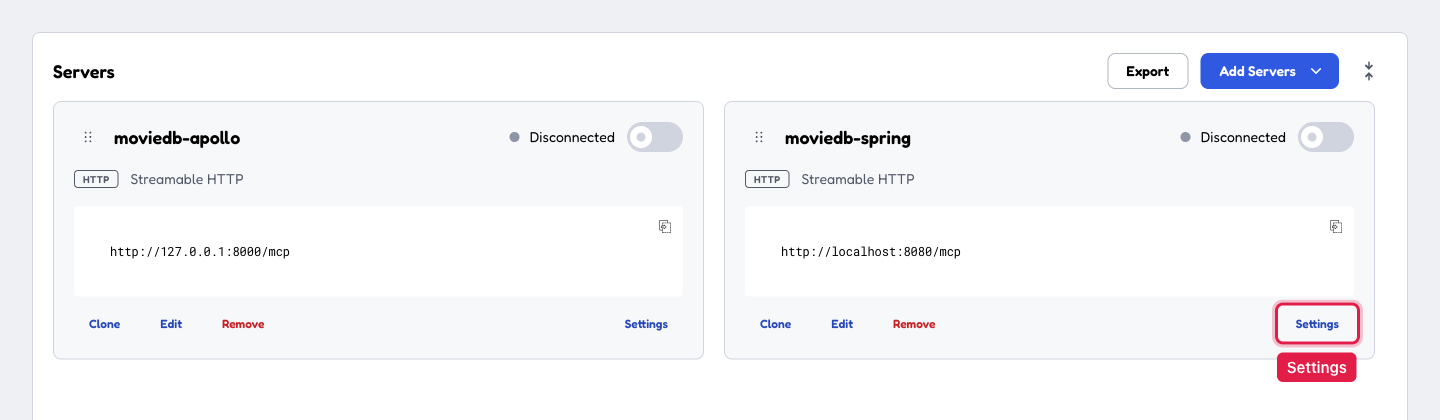
If the server cards show only their names, choose Expand all, the button with two arrows at the top right of the server list. Each card then shows its buttons.

-
On the server's card, choose Settings, at the bottom right of the card.
-
In the Server Settings dialog, open OAuth Settings, the last section, and enter
mcp-inspectoras the Client ID. If you tried to connect this server before, also choose Clear stored OAuth state. The dialog saves what you type, so close it when you are done.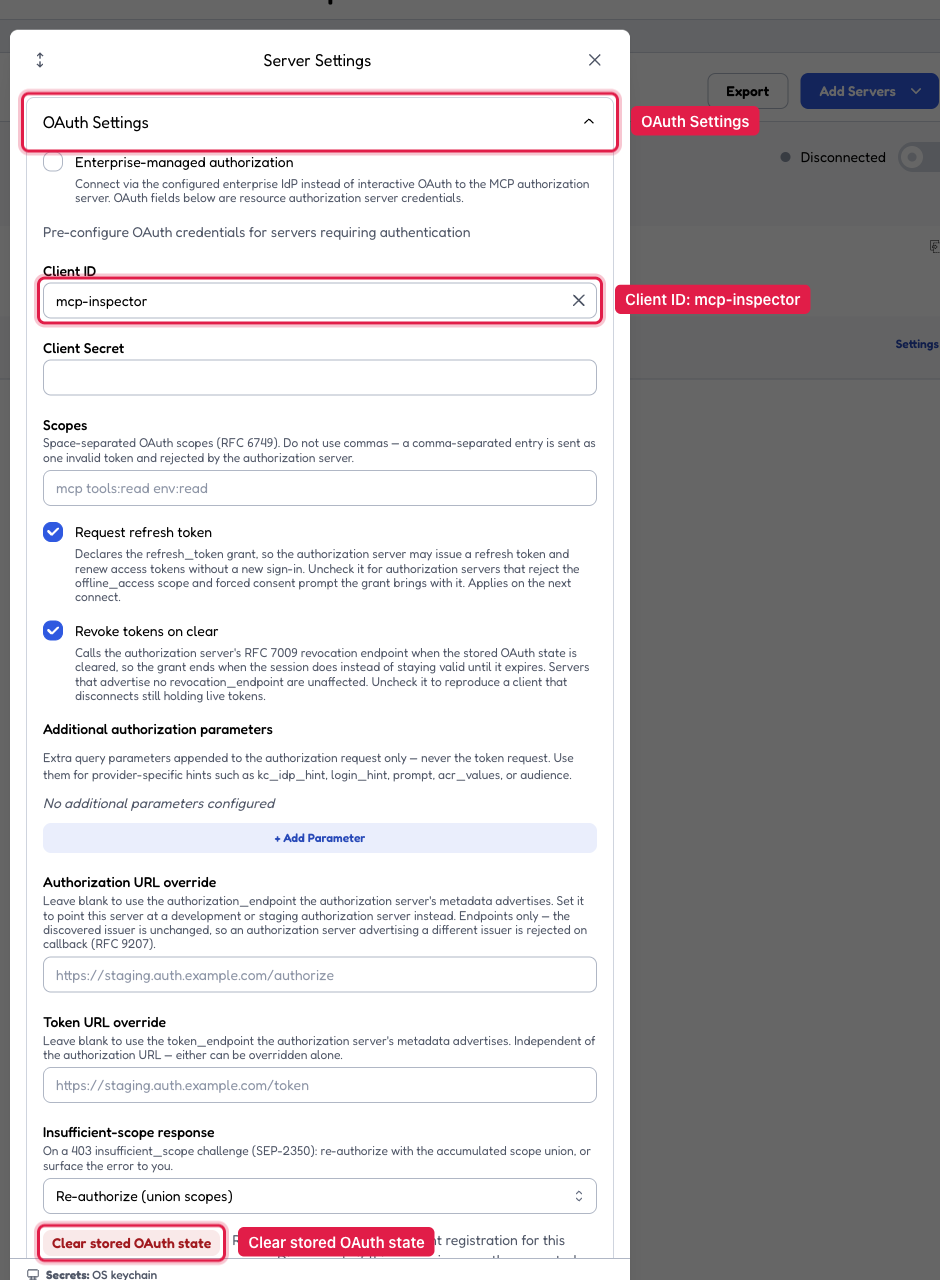
-
Turn the server on with the switch on its card. Inspector opens Keycloak's sign-in page.
-
Sign in as
user, with the passworduser123.
We verified these steps and screenshots with MCP Inspector 2.6.0.
Keycloak sends you back to Inspector, and the card shows Connected. Behind that sign-in, Inspector followed the discovery chain from the previous section:
- The first request to
/mcpgot the 401 and itsresource_metadatalink. - The metadata document named Keycloak as the authorization server.
- Keycloak's own metadata gave Inspector the sign-in and token addresses.
- After you signed in, Inspector exchanged the returned code for a token, using PKCE.
The token names mcp-inspector in azp and user in preferred_username. It has moviedb-mcp in aud and the four scopes in scope. To see it, choose Connection Info on the connected server's card. Its OAuth Details section lists the scopes and has a Decode JWT button for the access token.
If the Client ID is empty, the card shows Failed. Inspector tried to register itself as a new client, and the Network tab of the panel on the right shows the request to Keycloak's clients-registrations/openid-connect endpoint with 403 FORBIDDEN. Keycloak refuses the registration, because the realm accepts registrations only from trusted hosts. Enter the Client ID, choose Clear stored OAuth state, and connect again.
While a server is connected, a Servers / Tools switch appears at the top of the page. Choose Tools. The list shows all four tools, the three movie tools and ping, because the proxy-aware scanner finds them. Select recommendMoviesForMood, pick a mood, and choose Execute Tool. You can leave excludeWatched unchecked, because the tool treats a missing flag as false.
To check a missing scope, open the card's Settings again. Enter movies:read watchlist:read reviews:read in Scopes, choose Clear stored OAuth state, and close the dialog. Connect again, and sign in as user when Keycloak shows its sign-in page. The new token lacks watchlist:write. Call addToWatchlist with a movieId, such as 60 for Casablanca from the recommendMoviesForMood result. The server answers with HTTP 200 and a tool result marked isError: true, which Inspector shows as a Tool Error: Error invoking method: addToWatchlist Access Denied. The request authenticated, and only the method-level check failed. To get all four scopes back, empty Scopes and clear the stored OAuth state again.
To test with a token you request yourself, for example from a script, use the mcp-test client:
TOKEN=$(curl -s -X POST http://localhost:8180/realms/moviedb/protocol/openid-connect/token \
  -d "client_id=mcp-test" \
  -d "client_secret=<the Client Secret from step 6, or mcp-test-secret with the realm file>" \
  -d "grant_type=client_credentials" \
  -d "scope=movies:read watchlist:read watchlist:write reviews:read" \
  | jq -r .access_token)
Print the token with echo "$TOKEN", and paste it into the debugger on jwt.io. It decodes the token and shows the claims the MCP server checks:
audincludesmoviedb-mcp, which theaudiencessetting requires.scopelists the scopes you requested, plus Keycloak's ownprofileandemail.azpnames the client that requested the token, heremcp-test.expis one hour afteriat, because the realm's access token lifespan is one hour.
Remove watchlist:write from the scope line, request a token again, and the decoded scope no longer contains it. Paste only tokens from this local Keycloak into an online tool, because a token from a real system grants access to real data.
In Inspector, open the card's Settings, then Custom Headers, and choose + Add Header. Enter Authorization in the Key field, and Bearer followed by a space and the token in the Value field. Close the dialog, and turn the server off and on again. A custom Authorization header takes precedence over the sign-in, so remove it before you sign in again. If you forget, Keycloak still shows its sign-in page, but afterwards the card shows Failed with a Re-authentication required message that names invalid_token.
In this lesson, a signed-in user can run recommendMoviesForMood, summarizeMovieReviews and ping. addToWatchlist still fails. The watch list looks the user up by name, and this lesson's resource server takes the name from the token's sub claim. Keycloak fills sub with its internal user id. Choose a status such as WANT_TO_WATCH before you choose Execute Tool, and the tool returns an error like this one:
GraphQL operation failed: Entity AppUser not found for username: 3d7ea934-82c5-4d40-9d2e-87a659b60e45
Without a status, the server first asks for one, and Inspector opens an Elicitation Request dialog with the question from Class 11. If you leave it unanswered, the call ends after 20 seconds with a Tool Error that starts with Error invoking method: addToWatchlist Did not observe any item or terminal signal within 20000ms. Inspector keeps the dialog open, so choose Cancel to close it.
Class 18 tells the server to take the name from preferred_username, and the watch list tools work from then on.
If you want local development without Keycloak, Spring Authorization Server in a dev profile is the lightest option. The configuration stays the same, and only the issuer URI changes.
Summary
The MCP endpoint is now an OAuth 2.1 resource server, as the spec requires for HTTP servers that add authorization. A new security filter chain guards /mcp with tokens from the authorization server, and the base app's HMAC chain keeps serving /graphql as before. A client without a token gets a 401 whose WWW-Authenticate header points to the protected-resource-metadata document. That document names the authorization server, where the client gets a JWT. Spring validates the JWT against the issuer's JWK Set and the configured audience. @PreAuthorize checks a scope on each tool, and a missing scope returns HTTP 200 with an isError: true tool error. Class 7's seeding step passes the security context into the GraphQL execution, so the existing authorization rules keep working.
Further Reading
- MCP specification: Authorization - the spec's OAuth 2.1 requirements for HTTP transports, the two discovery mechanisms, and the RFC 8707 resource parameter mandate.
- Spring Security: OAuth 2.1 Resource Server - JWT validation, JWK Set URI, audience checks.
- Spring Security: Method security with @PreAuthorize - scope-based authorization on tool methods.
- OAuth 2.1 draft (IETF) - the protocol the MCP spec aligns with.
- RFC 8414: OAuth 2.0 Authorization Server Metadata and RFC 9728: Protected Resource Metadata - the discovery documents, including the
WWW-Authenticateresource_metadataparameter and the well-known path-insertion rule. - RFC 8707: Resource Indicators for OAuth 2.0 - the
resourceparameter MCP clients send when requesting tokens; theaudiencesconfiguration is the server half. - mcp-security (Spring AI community) - the packaged alternative to the metadata configuration in this lesson.
What's Next
Class 16 covers the threats that authentication cannot stop. A valid token leaves three problems open: prompt injection, how often an agent calls your API, and a record of which tools the agent called for which user. Class 16 covers the security work that is specific to agent clients:
- prompt-injection defense
- tool scoping
- confirmation before mutations
- audit logging
- rate limiting per caller